Usercentrics
Integrates Usercentrics consent management with walkerOS by listening for a configured window event and mapping category or service consent state to walkerOS consent groups.
Installation
npm install @walkeros/web-source-cmp-usercentrics
import { startFlow } from '@walkeros/collector';
import { sourceUsercentrics } from '@walkeros/web-source-cmp-usercentrics';

await startFlow({
  sources: {
    consent: {
      code: sourceUsercentrics,
      config: {
        settings: {
          eventName: 'ucEvent', // Must match your Usercentrics admin config
          categoryMap: {
            essential: 'functional',
            functional: 'functional',
            marketing: 'marketing',
          },
        },
      },
    },
  },
});
Configuration
This source uses the standard source config wrapper (consent, data, env, id, ...). For the shared fields see source configuration. Package-specific fields live under config.settings and are listed below.
Settings
| Property | Type | Description | More |
|---|---|---|---|
eventName | string | Window event name to listen for, configured in the Usercentrics admin (Implementation > Data Layer & Events). Use 'UC_SDK_EVENT' for the built-in Browser SDK event. Default: 'ucEvent'. | |
categoryMap | Record<string, string> | Map the CMP's consent categories (keys) to walkerOS consent groups (values). | |
explicitOnly | boolean | Only process consent_status events where type is 'explicit'. Ignores implicit/default page-load events. Default: true. |
Mapping
This package does not define custom rule-level settings. For the standard rule fields (consent, condition, data, batch, name, policy) see mapping.
Examples
Category map override
Custom categoryMap remaps essential to functional and functional to analytics
Custom event name
Using UC_SDK_EVENT instead of ucEvent for Usercentrics SDK v2
Full consent
A Usercentrics onAcceptAllServices event emits a walker consent command with essential, functional, and marketing granted.
Minimal consent
A Usercentrics onDenyAllServices event emits a walker consent command with only essential granted.
| Setting | Type | Default | Description |
|---|---|---|---|
apiVersion | 'auto' | 'v2' | 'v3' | 'auto' | Which Usercentrics API to target (auto-detects by default) |
eventName | string | 'ucEvent' | V2 window event name configured in Usercentrics admin |
v3EventName | string | 'UC_UI_CMP_EVENT' | V3 window event name (overridable for custom admin configs) |
categoryMap | Record<string, string> | {} | Maps Usercentrics categories to walkerOS consent groups |
explicitOnly | boolean | true | Only process explicit consent (user made a choice) |
V2 vs V3 support
The source supports both Usercentrics V2 (window.UC_UI) and V3
(window.__ucCmp) APIs. With the default apiVersion: 'auto', detection runs
at init:
- If the CMP is already initialized, consent is read statically from the
available API — this fixes the race where V3's
UC_UI_CMP_EVENTfires before walkerOS loads. - If no CMP is present yet, listeners for both V2 and V3 events are registered so late-loading CMPs are still caught.
- When both APIs are available, V3 is preferred.
Set apiVersion: 'v2' or 'v3' to force a specific integration.
Usercentrics setup
Configure a Window Event in your Usercentrics admin:
Implementation > Data Layer & Events > Window Event Name (e.g., ucEvent).
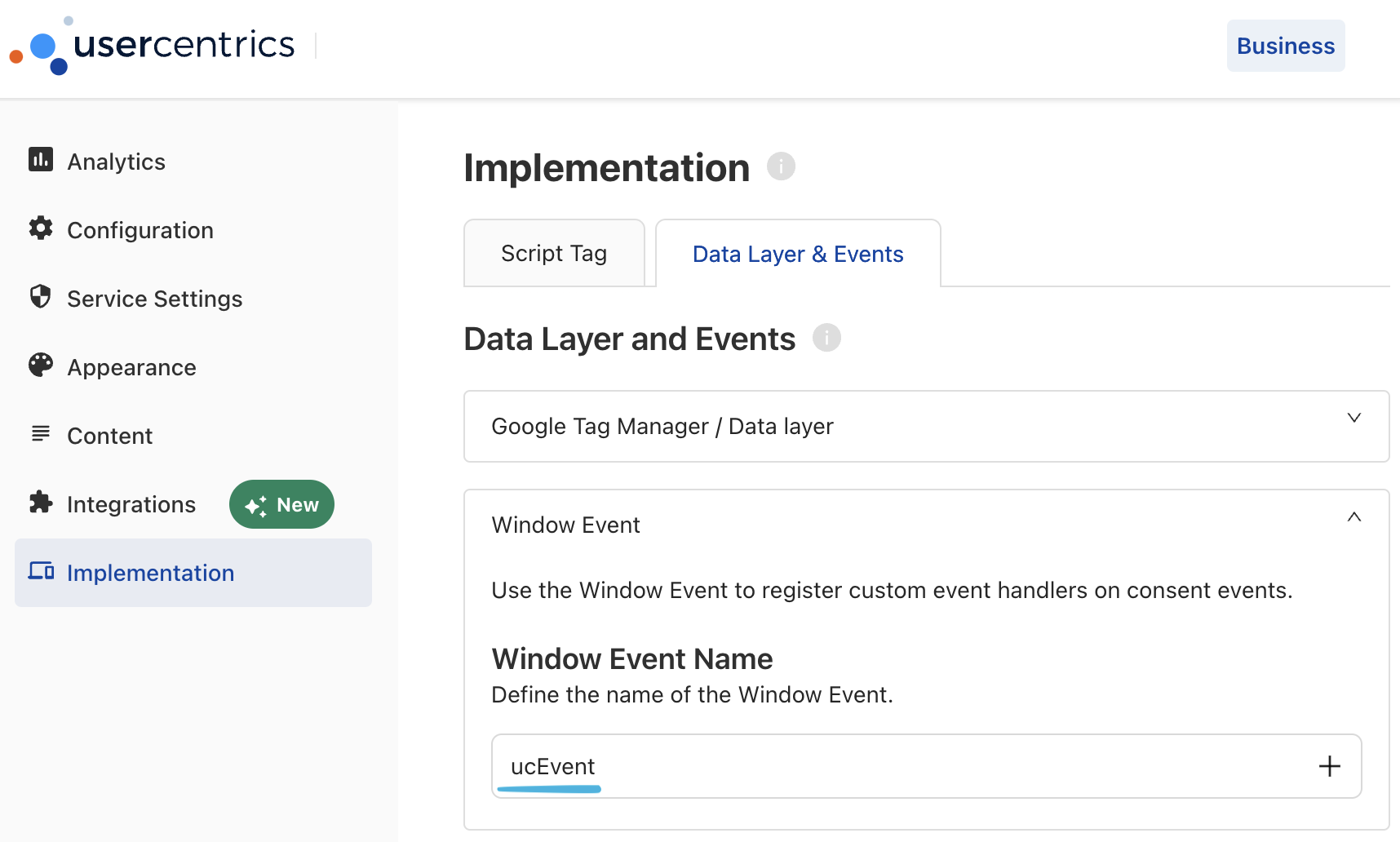
Alternatively, set eventName: 'UC_SDK_EVENT' to use the built-in Browser SDK
event (no admin configuration required).
Custom mapping example
await startFlow({
  sources: {
    consent: {
      code: sourceUsercentrics,
      config: {
        settings: {
          eventName: 'ucEvent',
          categoryMap: {
            essential: 'functional',
            functional: 'functional',
            marketing: 'marketing',
          },
          explicitOnly: true,
        },
      },
    },
  },
});
How it works
-
API detection: Reads consent statically from
window.UC_UI(V2) orwindow.__ucCmp(V3) if already initialized, otherwise registers event listeners for both APIs so post-init events are still captured. -
Group vs. service detection: Checks if
ucCategoryvalues are all booleans:- Group-level: Uses
ucCategoryas consent state (maps categories viacategoryMap) - Service-level: Extracts individual service booleans from
event.detail(normalized tolowercase_underscores) and appliescategoryMapto booleanucCategoryentries
- Group-level: Uses
-
Explicit filtering: By default, only processes events where
type === 'explicit'(user actively made a choice). SetexplicitOnly: falseto also process implicit/default consent. -
Consent command: Calls
elb('walker consent', state)with the mapped consent state.
Timing considerations
The source should be initialized before the Usercentrics script loads to avoid
missing the initial consent event. When using explicitOnly: true (default),
this is not a concern since the implicit init event is filtered anyway. For
explicitOnly: false, ensure the consent source has no require constraints
so it initializes immediately.